
Products are listed on the Product sync tab — what should I do?
Published:2026-08-07 16:20/Updated:2026-10-08 22:19
What unmatched SKUs mean and how to resolve them.
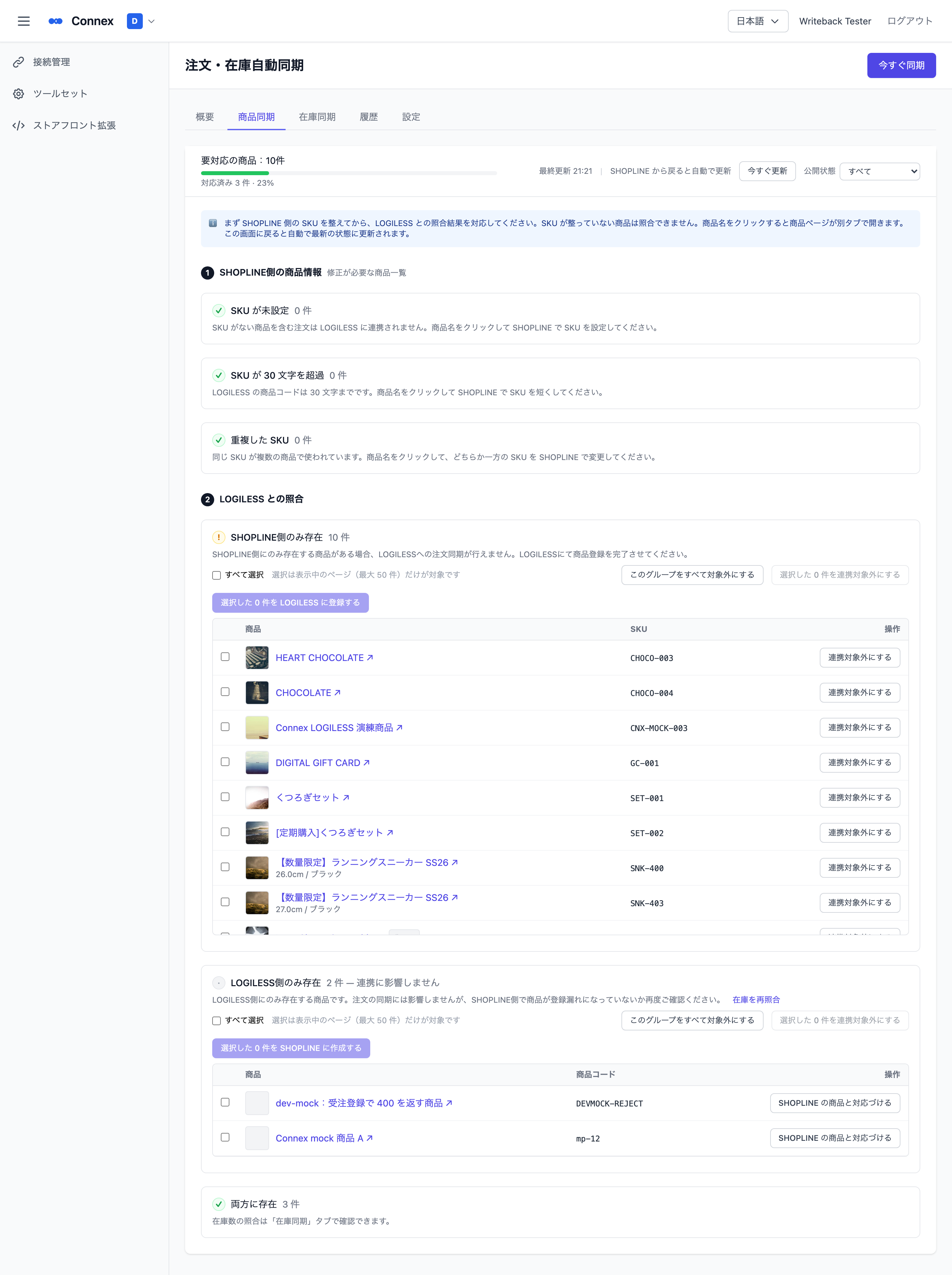
The [Product sync] tab lists products that do not match between SHOPLINE and the linked system (e.g. LOGILESS), grouped by reason. A listed product is excluded from order linking and inventory sync until its reason is resolved. You can also reach this screen from the "Action needed: N product(s)" notice on the [Overview] tab.
Where to start
Work from the top down. Products with SKU problems cannot be reconciled, so clear section 1 first. You are done when "Products needing action: N" at the top reaches 0.
1. Product info on SHOPLINE (fix on the SHOPLINE product page)
| List | What happens | What to do |
|---|---|---|
| No SKU | Orders containing this product are not linked | Click the product name and set a SKU in SHOPLINE |
| SKU exceeds 30 characters | Cannot be registered on the linked system | Assign a shorter SKU (the limit depends on the linked system and is shown on screen) |
| Duplicate SKUs | The stock write target cannot be determined | Change one of the SKUs |
The product page opens in a new tab. When you return to this screen it refreshes automatically and shows how many were resolved ("N resolved"). When auto-sync is enabled, stock for a product is synced within about 1–2 minutes after you set its SKU.
2. Comparison with LOGILESS
| List | What happens | What to do |
|---|---|---|
| Only in SHOPLINE | Orders containing this product are not linked | Select the rows and click [Register N selected in LOGILESS] to register them on the linked system with the product name and product code (= SKU) (stock is registered as 0, so receive stock on the linked system). Products you do not intend to link can be removed from the list with [Exclude from linking] (you can [Restore] at any time) |
| Only in LOGILESS | Does not affect linking | If the same product exists in SHOPLINE, use [Pair with a SHOPLINE product] and pick a product without a SKU — the product code is set as that product's SKU. If not, select the rows and click [Create N selected in SHOPLINE] to create drafts in SHOPLINE with only the name and SKU. No price is sent, so they appear at ¥0 in the SHOPLINE product list — set price, images and visibility in SHOPLINE (bundle products are not created) |
| Excluded | Not linked (by your choice) | Products set to not link. Press [Restore] to lift the exclusion and return them to their original list |
| In both | Aligned | Nothing to do. Stock level comparison is on the [Inventory sync] tab |
When there are many products
- Each list shows 50 items per page. Use the pager below the table to move between pages. The count next to the heading is the list total
- [Select all] selects only the current page (up to 50 items). [Create in SHOPLINE] and [Register in LOGILESS] also handle up to 50 items at a time
- To exclude a whole list at once, use [Exclude this entire group]. In the [Excluded] list, [Restore all] restores them all at once
- If you start another action while one is running, "処理中です" (processing) is shown. Wait until it finishes
Note
Connex fetches and stores the LOGILESS product list in the background (everything when you save the initial setup, then only changes every 5 minutes), so this screen appears within seconds. During the first fetch it shows "Fetching LOGILESS products (N fetched so far)" and switches to the list automatically when done. To reflect a product you just registered or changed in LOGILESS, click [Refresh now] (products registered to LOGILESS from this screen appear immediately). For CROSS MALL it is reflected after the next inventory sync.
If it still does not disappear
| Cause | How to check |
|---|---|
| Product codes do not match | Check that the store SKU and the linked system's product code match exactly (upper/lower case, leading/trailing spaces) |
| Product code exceeds the length limit | A SKU over the limit cannot be registered on the linked system. You need to assign a shorter SKU on the store side |
Warning
[Exclude from linking] only removes the product from the list; orders containing it are still not linked. Do not use it for products you intend to link.
Was this article helpful?